Hearts: Classic Card Game
- 4.7
- Rating
- 1.00M
- Installs
- Free
- Price

 Analysis by App-foxy
When I want a quiet card game that I can start without arranging a table, Hearts: Classic Card Game is the kind of app I reach for. It keeps the familiar trick-taking format at the center, but gives me a computer opponent so a short break does not depend on finding three other players. After spending time with it, I see the main appeal clearly: this is a straightforward digital version of Hearts, made for quick solo sessions rather than a large social platform.
That focus is useful in a shared household. Someone can pick up the phone or tablet, play a few hands, and put it down without needing another person to continue the match. It is also easy to understand why the game has attracted a broad audience: it is free, rated for Everyone, and has passed one million installs. The average score of 4.7 from roughly 47 thousand ratings suggests that many players enjoy the simple formula, although a popular rating should not replace checking whether the style suits your own habits.
How Hearts feels in everyday play
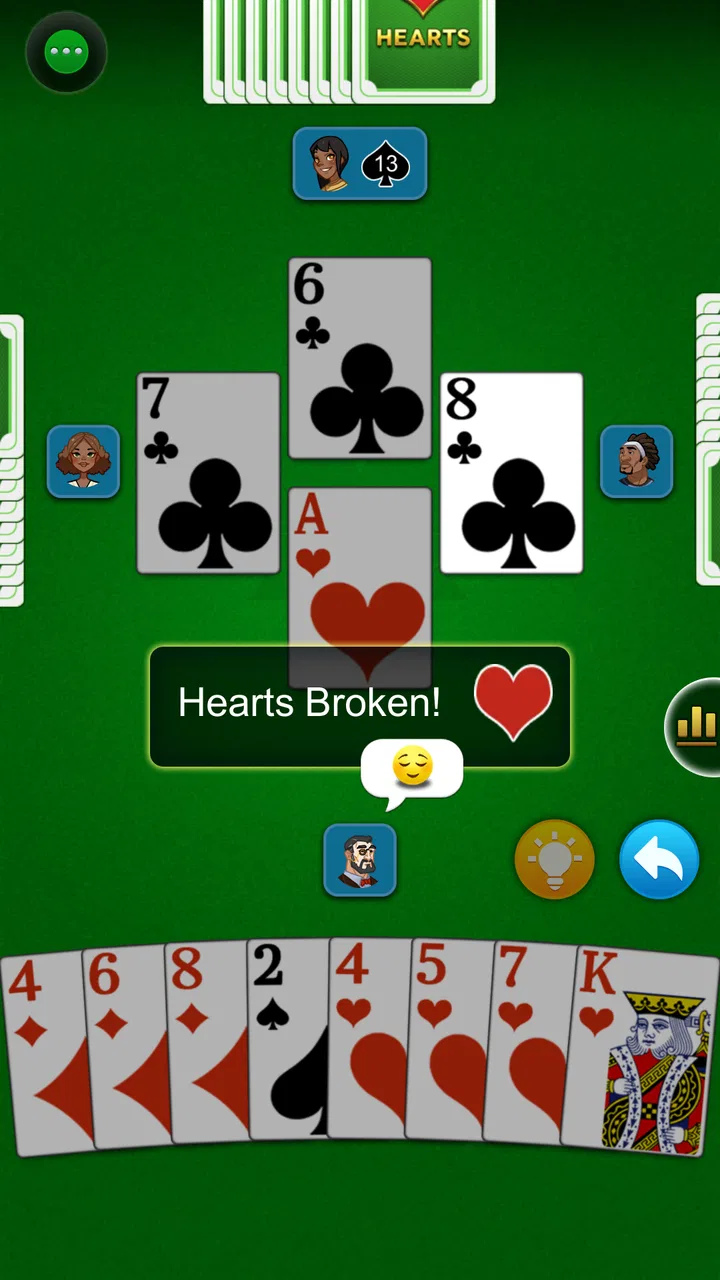
I find the everyday appeal of Hearts is how easily a spare moment can become a focused hand: I can settle into its familiar card decisions without arranging a group. The useful trick is to decide whether I’m playing to relax or to sharpen my reading of suits, since that changes how much attention I give each move. From that personal rhythm, it’s natural to look at how the game’s visual language supports the table.
You May Also Like

 Blood Strike: 2.5 Anniversary
Blood Strike’s Loadouts Turn Every Drop Into a Tactical Gamble
A close look at Blood Strike’s custom loadouts: how fast access to signature weapons reshapes its battle royale rhythm, rewards preparation, and narrows the gap between fights.

 Pandora - Music & Podcasts
Pandora’s Music Is Easy to Start, but Harder to Recover
Pandora’s strength is its low-effort path from a seed to a station. Its weak spot is how much confidence it asks you to place in connection, setup, and quiet recovery.

 8 Ball Pool
 Is Built on Rivalries, Rematches, and Routine
A close look at the rivalries, rematches, shared routines, and unanswered safety questions that turn a quick pool match into a persistent mobile community.

 Samsung Music
’s Quiet Strength Is Playing What You Already Own
Its reach comes less from spectacle than from dependable access to a personal library. That simplicity is both the app’s strongest retention engine and its ceiling.

 AccuWeather: Weather Radar
AccuWeather Review: A Quick, Clear Forecast for Everyday Decisions
For everyday plans, the best forecast is the one you can understand quickly. AccuWeather makes rain timing, radar, and local conditions easy to act on, with a few trade-offs.

 Hill Climb Racing
Why Hill Climb Racing Still Turns Crashes Into One More Run
A tiny car, a bumpy hill and one more upgrade: Hill Climb Racing keeps resurfacing because its simple chaos makes every near-miss feel personal.
More From Our News Desk



A good fit for short, self-contained sessions
Hearts works best when I treat each hand as a small decision-making exercise. The rules are familiar to anyone who has played the traditional game: players manage a hand of cards, choose what to pass, follow suit when possible, and try to avoid taking unwanted penalty cards. The pleasure comes from reading the table, remembering what has already appeared, and deciding when a risky card is worth playing.
That structure makes the app practical for ordinary moments. I can imagine using it while waiting for an appointment, during a commute when it is safe and appropriate to do so, or at home when I want something more engaging than scrolling. A hand has a clear beginning and end, so the game does not demand the long uninterrupted attention of a strategy game or a multiplayer match.
The computer-controlled opponents are central to the experience. The store description highlights smart AI, and in practical terms that means the app is designed to provide a playable solo table rather than merely deal cards and leave the rest feeling empty. Still, I would keep expectations realistic: an AI opponent cannot reproduce the surprises, table talk, or personal habits of real friends. If your favorite part of Hearts is watching people bluff, tease one another, or make emotional mistakes, a human group remains better.
What I pay attention to during a hand
The passing stage deserves more thought than a beginner may expect. I do not simply throw away the highest cards. I look at suits, consider whether I am creating a void, and think about which dangerous cards may return to me later. Removing a high card can be helpful, but it can also leave me unable to control a suit when I need to avoid winning a trick.
Once play begins, I try to separate immediate safety from long-term control. A low card may look harmless, yet it can force me to win a later trick if the suit is led at the wrong time. On the other hand, keeping a strong card can give me a way to take control and lead a suit that is uncomfortable for the other players. The app is most satisfying when I use it to practice these judgments instead of playing every card automatically.
A useful habit is to remember who has already failed to follow a suit. That information changes the risk of leading it again. If one opponent is void, a seemingly safe lead may allow that player to discard a penalty card. This is one of the less obvious ways to improve: I do not need to memorize every card, but I should track voids and the dangerous cards that have appeared.
Shared-device use without confusing the experience
For a household sharing one device, the game is naturally easy to hand over because a single session can be played independently. One person can finish a round, pass the device to another, and let the next player begin their own session. That makes it more suitable for casual turn-taking than an app built around a persistent personal account.
There is an important boundary, though. I would not treat shared-device convenience as proof that the app separates players, saves individual progress, or provides household profiles. The safest approach is to regard each session as belonging to whoever is holding the device at that moment. If several people care about tracking results, they should agree on a simple method outside the game, such as writing down scores, rather than assuming the app will organize a family leaderboard.
This matters especially on a tablet left in a common room. A child may open the game after an adult, or an adult may continue a session started by someone else. That is not necessarily a problem for a casual card game, but it can make personal records or unfinished rounds difficult to interpret. For a relaxed household, that is a minor inconvenience. For competitive relatives who want reliable individual statistics, a dedicated multiplayer service may be a better choice.
Setup, device boundaries, and spending awareness
The entry point is simple: it is a free card game from Topy Games, with a minimum operating-system requirement of Android 6.0. That makes it accessible on many older Android devices, although compatibility is not the same as a guarantee of identical performance on every phone or tablet. On a shared device, I would still check that there is enough storage and that the operating system is supported before asking a child or another family member to install it.
The current version is 1.3.15.20260306. Version information is useful when troubleshooting because two devices may not be running the same build. If one household member reports a different layout or behavior, checking the installed version is a sensible first step rather than assuming that someone is playing incorrectly.
Free installation does not mean every part of the experience is necessarily free of optional spending. The game lists in-app purchases at $9.99 per item. In a shared household, I would make that boundary clear before handing over a device, especially if the device is connected to a payment method. A child who understands the card rules may not automatically understand that an in-game purchase can be charged through the device account.
I also prefer to separate two questions: can everyone play the basic game, and is anyone allowed to buy extras? The first answer is yes in the sense that the title is free to install; the second should be decided by the device owner. That small conversation prevents the common mistake of treating a free download as permission for unrestricted purchases.
Coordinating a household session
Although the app is primarily a solo experience against AI, it can still support a shared routine. One person might play a hand before dinner, another might take the device later, and everyone can compare decisions rather than compete in real time. I find this kind of informal coordination more realistic than trying to turn the app into a full family tournament.
If I were introducing it to someone new, I would first explain the objective in plain language: avoid taking penalty cards unless there is a deliberate reason to accept them, and watch the suits carefully. Then I would let the new player make the passing decisions without taking over. Those early choices teach more than simply watching an experienced player click through the hand.
A useful household rule is to pause only between hands, not during a trick. That keeps the game fair when the device changes hands and prevents someone from receiving advice after seeing part of a decision. If the goal is learning rather than competition, advice can be discussed after the hand, when everyone can examine why a card was safe or dangerous.
Another practical tip is to keep the first sessions short. Hearts can become mentally tiring when every card is analyzed, especially for a younger or inexperienced player. Playing one or two hands and then discussing a single decision—such as why a high card was passed—creates a better introduction than demanding a complete match.
Age context and trust
The Everyone content rating makes the game appropriate in age terms for a broad audience, and the card format is easy to explain without complicated fictional violence or mature themes. That makes it more comfortable for a family tablet than many competitive games. Even so, age suitability and household trust are separate issues.
I would still show a younger player how the device handles purchases and explain that the app should not be used to buy anything without permission. The game itself may be gentle, but the surrounding phone or tablet can contain personal information, payment access, and other apps. A shared-device plan works best when the child knows which actions are part of playing and which actions require an adult.
For older relatives, the appeal is different. The rules resemble a traditional card table, while the AI removes the need to coordinate schedules. The main challenge may be reading small cards or navigating unfamiliar controls, depending on the device. I would let the player adjust their grip and viewing distance rather than assuming that a simple game needs no accessibility consideration.
Trust also affects how much guidance is appropriate. If two adults are sharing the game casually, there is no reason to monitor every hand. If a child is using a payment-enabled device, a quick explanation of purchase boundaries is sensible. The app can be treated as low-risk entertainment without treating the entire device as consequence-free.
Where it stands beside other card-game choices
Compared with a physical Hearts deck, this app removes setup, card handling, and the need for three other people. That is its clearest advantage. It also avoids the awkwardness of losing a card under the sofa or trying to remember whose turn it is. The trade-off is that the digital table feels less social and gives me less control over the atmosphere.
Compared with online multiplayer card games, the solo format is calmer and less dependent on a connection or on finding opponents at the right time. That is valuable when I want predictable, interruption-free play. The downside is that I do not get the personality and unpredictability of real players, and I would not choose this app if live competition or chat is the main reason I enjoy card games.
Compared with a general card-game collection, this title has a narrower purpose. That can be a strength because I can open it knowing exactly what I will play. It is less attractive for someone who wants Solitaire, Spades, Rummy, or several variants in one installation. In that case, a broader collection may provide better value even if its individual Hearts mode feels less focused.
The AI also creates a particular trade-off. It gives me an opponent whenever I want one, but repeated solo play can become predictable if I stop challenging my own habits. I get more from it when I review why I lost a trick, vary my passing choices, and avoid blaming every bad result on luck. Players looking for sophisticated human-like adaptation should compare it with a live multiplayer option instead.
Small techniques that make the game more rewarding
My first practical recommendation is to treat the passing decision as a plan for the whole hand. Before choosing cards, I count the suits and ask whether I want to shorten one suit, protect a vulnerable high card, or keep enough control to lead later. Passing three cards without a purpose often creates problems that look like bad luck several tricks afterward.
Second, I avoid chasing a dramatic reversal unless the hand genuinely supports it. Taking every penalty card in an attempt to pass them all back can be exciting, but it is also easy to misjudge. I look at whether I can realistically control the remaining tricks, rather than assuming that collecting a large group of penalties will automatically help.
Third, I use the app as a memory exercise. After each trick, I mentally note the suit led, who could not follow, and whether a dangerous card has already been played. I do not need a perfect record; remembering just one void and one missing high card can improve the next decision. This turns a simple time-filler into a compact practice tool for card awareness.
Fourth, I separate a bad hand from a bad decision. A strong opponent or an unfortunate deal can make a sensible plan fail. If I review only the result, I may learn the wrong lesson. I instead ask whether the card made sense with the information available at that moment. That mindset keeps the game enjoyable and makes repeated sessions feel less repetitive.
Who should choose it—and who should skip it
I would recommend this game to someone who already knows Hearts or wants a gentle way to learn trick-taking. It is especially suitable for solo players, people who enjoy short strategic sessions, and households that want a card game available without arranging a group. The free entry point and Everyone rating make it easy to consider, while the large install base shows that it has reached well beyond a tiny niche.
I would be more cautious about recommending it to someone who needs deep customization, a strong social layer, or a broad library of card games. It is also not my first choice for a family that expects separate profiles, carefully organized personal records, or a built-in tournament system. Those needs call for a more feature-heavy alternative, even if that alternative feels less immediate.
Players who dislike losing to computer opponents should also know what they are signing up for. Hearts involves uncertainty, and a digital opponent does not remove that. The app is best approached as a repeatable game of decisions, not as a guaranteed relaxation session where every hand goes well.
My household verdict
After using it as a focused solo card game, I think Hearts: Classic Card Game succeeds because it does not need a complicated setup to be useful. I can open it for a quick hand, practice reading suits, or pass the device to another household member without organizing a full table. Topy Games has chosen a familiar format with enough tactical depth to reward attention beyond the first few rounds.
The limitations are equally clear. Shared-device use requires common-sense boundaries because the experience should not be mistaken for a multi-profile family system. The AI is convenient but cannot replace human personality, and optional purchases priced at $9.99 per item make it worth discussing spending rules on a family device. Those are manageable concerns, not reasons to dismiss the game, provided expectations are realistic.
For me, the best reason to install it is the combination of availability and concentration: a traditional game, ready for one person, with no need to wait for friends. I would choose a physical deck for a lively family evening and an online multiplayer game for direct competition. For a quiet break, a learning session, or a shared tablet that needs a simple Everyone-friendly activity, this free Hearts app is an easy recommendation.
FAQs for Hearts: Classic Card Game
01What platforms is Hearts: Classic Card Game available on?
Hearts: Classic Card Game is available for both Android and iOS platforms. You can download it from the Google Play Store for Android devices and the Apple App Store for iOS devices. Ensure your device meets the minimum system requirements for optimal performance.
02Is an internet connection required to play Hearts: Classic Card Game?
No, an internet connection is not required to play Hearts: Classic Card Game in single-player mode. However, if you wish to engage in multiplayer games or access online leaderboards, you will need an internet connection. Offline play is available for those who prefer to play solo.
03Does Hearts: Classic Card Game offer any customization options?
Yes, the game offers a variety of customization options. Players can choose from different card designs, table backgrounds, and adjust the difficulty levels for AI opponents. These features allow players to tailor their gaming experience to their personal preferences.
04Are there in-app purchases in Hearts: Classic Card Game?
Hearts: Classic Card Game is free to download and play, but it does offer in-app purchases. These may include options to remove ads, purchase additional card designs, or unlock premium features. Players can enjoy the core game without spending money, but optional purchases enhance the experience.
05Is Hearts: Classic Card Game suitable for children?
Hearts: Classic Card Game is suitable for older children and adults. The game involves strategic thinking and understanding of card mechanics, making it potentially challenging for younger children. It’s a great way to develop problem-solving skills, but parental guidance is advised for very young players.
Pros
- Easy to learn
- even for beginners.
- Smooth graphics enhance gameplay.
- Variety of difficulty levels.
- Multiplayer mode with friends.
- No intrusive ads during play.
Cons
- Limited customization options.
- Occasional connection drops.
- Needs more card variants.
- AI can be predictable.
- No offline multiplayer option.

Hearts: Classic Card Game
Gallery